01
One operating record
Applications, vendors, permits, sessions, payments, and reports stay tied to the same market workflow.
Market manager software workflow markers summarize the operating scope covered by this public product page.
Market teams often start with spreadsheets because spreadsheets are familiar. The problem is that vendor markets do not stay simple for long. Applications, documents, permits, stall assignments, weather changes, payment status, attendance, and reporting all start to live in different places.
The Market Manager gives operators one connected workspace for the recurring market cycle: plan the season, collect vendor applications, review readiness, assign vendors, run the market day, close out money, and report on what happened.
Start the public registration flow with the starter plan selected.
Open public pricing to compare plans and operating limits.
Open the custom plan request form for larger or unusual market operations.
Product image and outcome cards describing one operating record, less weekly cleanup, and better market decisions.
Market manager software outcome cards describe the main operating improvements buyers can compare on this page.
One operating record reduces duplicate tracking across applications, vendors, permits, sessions, and reports.
Readiness and closeout context stays visible without rebuilding weekly spreadsheet summaries.
Connected context helps managers spot market-day risks before they become urgent.
A focused rollout gives the team evidence that a connected operating record improves the market week before it changes every process at once.
Choose the application, permit, map, fee, or closeout handoff that creates the most repeated work today.
Use current vendors, actual requirements, and the next market dates so the workflow is tested under real conditions.
Measure duplicate entry, blocked-vendor follow-up, assignment changes, closeout time, and the quality of the final report.
Each part of the page maps to a real operating decision: what replaces the spreadsheet stack, how the team works through the week, what stays connected, and what managers should measure.
Market manager workflow operating outcomes explain how connected records reduce weekly coordination gaps.
One operating record reduces duplicate tracking across applications, vendors, permits, sessions, and reports.
Applications, vendors, permits, sessions, payments, and reports stay tied to the same market workflow.
Readiness and closeout context stays visible without rebuilding weekly spreadsheet summaries.
The team can see readiness, gaps, assignments, and closeout work without rebuilding the story in spreadsheets.
Connected context helps managers spot market-day risks before they become urgent.
Operational context carries from intake to market day so managers can act before small problems become urgent.
Buyers can evaluate the market workflow here, while applications, vendor details, permits, payments, assignments, notes, and reports remain inside authorized workspaces.
Market manager public boundary notes distinguish buyer-facing product content from protected workspace records.
Public product pages help buyers evaluate workflows without exposing workspace records.
This page explains the workflow, pricing path, and public resources for evaluation.
Private operating records remain protected inside authenticated workspaces.
Applications, vendor notes, permits, payments, assignments, and reports stay behind authorized access.
Market manager software workflow sections break down the buying page by intake, operations, and reporting decisions.
Market manager software should reduce repeated data entry and make the operating picture easier to trust. The Market Manager replaces disconnected application forms, spreadsheet rosters, email-based permit chasing, manual booth notes, separate payment trackers, and after-the-fact reporting cleanup.
The core value is continuity. A vendor application should become vendor context. Vendor context should inform permits, sessions, billing, assignments, notes, and reports. When those pieces stay connected, the team spends less time reconciling the same facts in different tabs.
These bullets summarize the operational clarity gained in this workflow section.
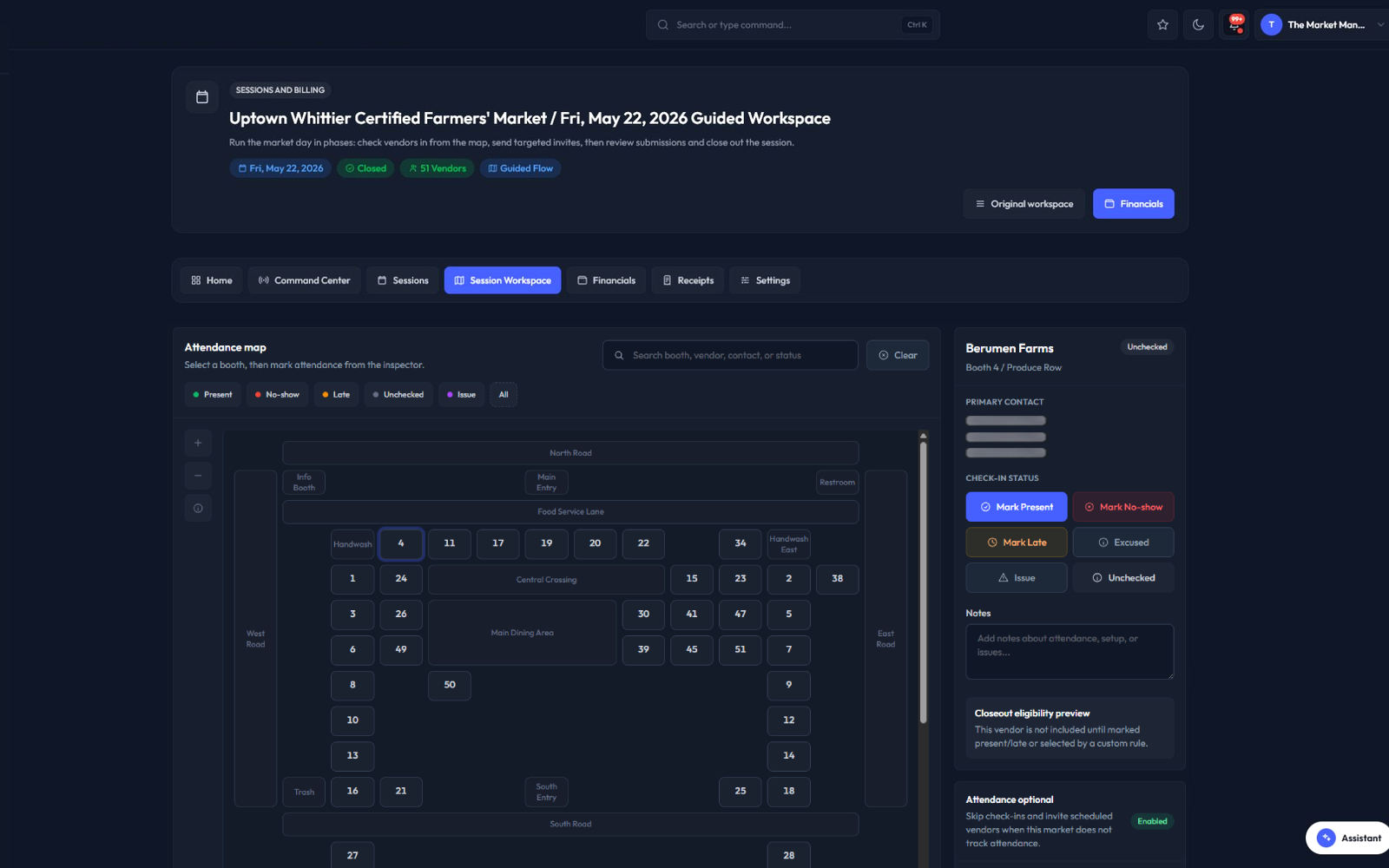
The Market Manager is built around the real sequence of running a vendor market. First, the team opens application programs and collects vendor details. Next, reviewers decide who is ready, who needs updates, and who should be approved. Then the operating team plans sessions, assignments, permits, and communication. After the market, billing and reports preserve the operational history.
These bullets summarize the operational clarity gained in this workflow section.
The product is not a single-purpose form tool. Applications, vendor records, permits, sessions, billing, reports, and public resources work together so the team does not have to rebuild the same story in multiple tools.
A market operator can move from a public application to a vendor profile, from a permit gap to a market-day decision, and from a session closeout to a report without losing the operating context.
These bullets summarize the operational clarity gained in this workflow section.
Spreadsheets are flexible, but they depend on constant human reconciliation. A spreadsheet can store a roster, but it does not know whether an application, permit, assignment, payment, and report are referring to the same vendor record.
The Market Manager turns separate lists into a connected operating system for recurring vendor programs. That matters when the team needs to answer what changed, who is ready, what is unpaid, and what needs attention before the next market day.
These bullets summarize the operational clarity gained in this workflow section.
The Market Manager is built for buyers comparing market manager software, farmers market management software, vendor application tools, market map tools, and session closeout systems. Its strongest fit is teams that want those workflows connected instead of buying a separate form tool, map planner, billing tracker, and reporting spreadsheet.
The platform includes vendor applications, applicant review, vendor records, permit and document tracking, booth assignment workflows, market map planning, public visitor-safe map outputs, market-day check-in context, session notes, fee review, benefit-program reporting such as SNAP or EBT, closeout records, exports, and management reporting.
These bullets summarize the operational clarity gained in this workflow section.
A weekly cadence can be the normal operating base, but real market calendars need exceptions. Teams can manage recurring schedules, special open or closed dates, blackout dates, seasonal hour overrides, manual sessions, month generation, and upcoming-session sync.
That means a year-round market, seasonal market, holiday market, weather-adjusted market, or one-off vendor-market day can stay connected to the same vendor, map, fee, closeout, and reporting records instead of becoming a separate spreadsheet.
These bullets summarize the operational clarity gained in this workflow section.
The Market Manager is built for teams running recurring vendor markets where applications, vendor communication, permits, assignments, payments, and reporting are part of the same weekly operating rhythm.
These bullets summarize the operational clarity gained in this workflow section.
Better software should make the market easier to manage and easier to understand. The most useful metrics are operational: application volume, approval status, blocked vendors, permit gaps, payment posture, session closeout progress, and recurring issues.
These bullets summarize the operational clarity gained in this workflow section.
Expand one answer at a time without leaving this public product page.
Expand or collapse this market manager software FAQ answer.
Expand or collapse this market manager software FAQ answer.
Expand or collapse this market manager software FAQ answer.
Expand or collapse this market manager software FAQ answer.
Expand or collapse this market manager software FAQ answer.
Expand or collapse this market manager software FAQ answer.
Expand or collapse this market manager software FAQ answer.
Read the resources behind this workflow before choosing a market operating system.
Related public resource guides provide supporting checklists and comparisons for market manager software buyers.
Open this supporting public resource guide.
How To Choose Farmers Market Management Software Read resourceOpen this supporting public resource guide.
Spreadsheet Vs Farmers Market Management Software Read resourceOpen this supporting public resource guide.
Market Day Operations Checklist Read resourceOpen this supporting public resource guide.
Farmers Market Vendor Application Checklist Read resource