01
One operating record
Applications, vendors, permits, sessions, payments, and reports stay tied to the same market workflow.
Automation for a farmers market should not mean losing manager judgment. The useful version is repeatable operational support: create the next sessions, surface readiness gaps, prepare planning work, route follow-up, and make reports easier to review.
The Market Manager focuses on automation that keeps recurring market work moving while preserving approval, permissions, and team context. It helps teams reduce weekly setup, catch operational signals, and turn recurring follow-up into visible planning work.
Product image and outcome cards describing connected market operations.
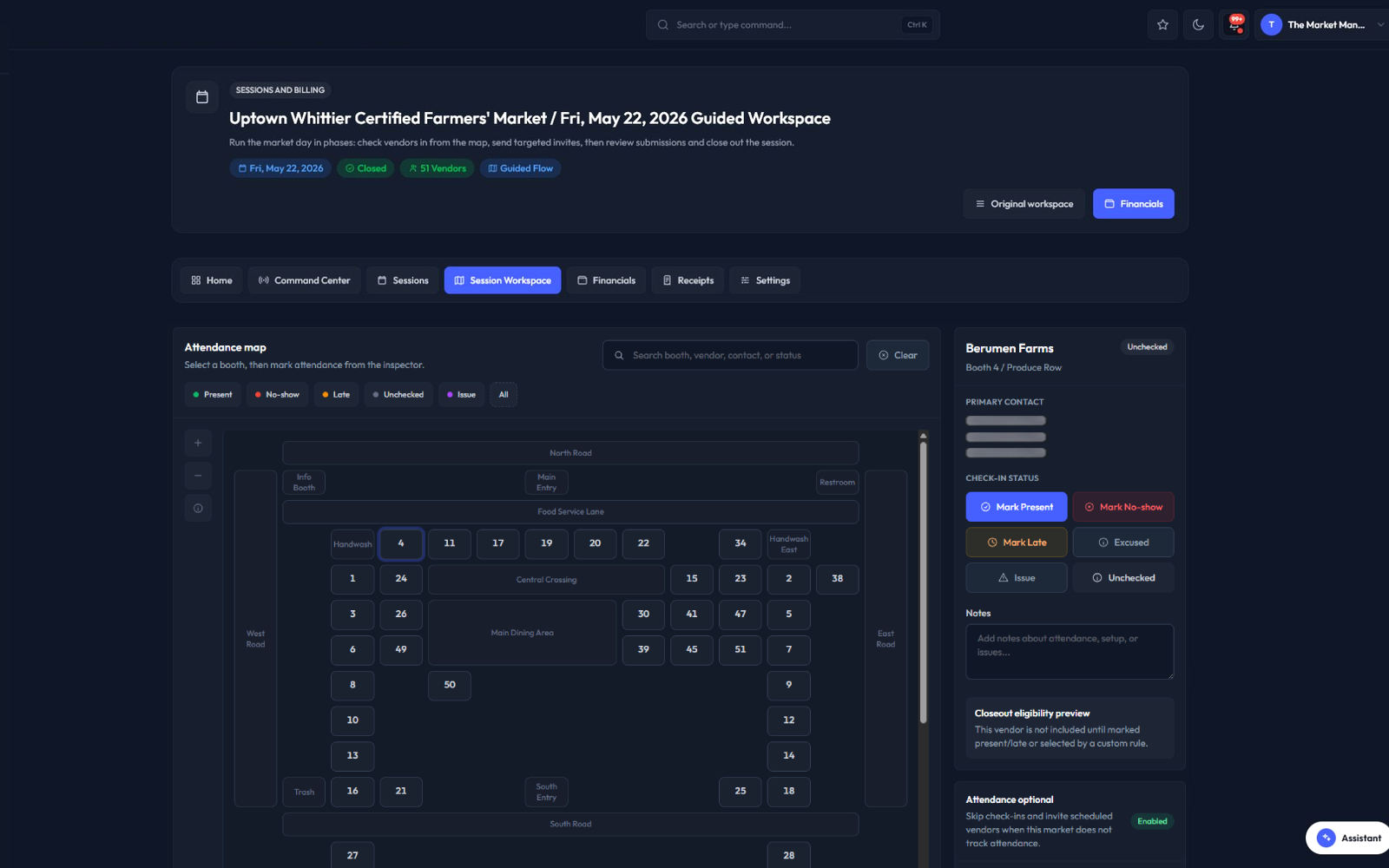
Applications, vendors, permits, sessions, payments, and reports stay tied to the same market workflow.
The team can see readiness, gaps, assignments, and closeout work without rebuilding the story in spreadsheets.
Operational context carries from intake to market day so managers can act before small problems become urgent.
Each part of the page maps to a real operating decision: what replaces the spreadsheet stack, how the team works through the week, what stays connected, and what managers should measure.
Recurring markets need the next operating dates to exist before the team can assign vendors, review fees, check readiness, and prepare closeout. The Market Manager includes session schedule sync workflows so teams can generate upcoming sessions from active market schedules instead of rebuilding every week by hand.
Operations Autopilot turns live operational signals into a planning board for the next seven days. It can prepare a weekly market readiness plan from critical work, permit signals, upcoming sessions, support items, and assigned tasks.
The workflow is designed around manager review. It helps the team see what needs attention without claiming that software should make every judgment automatically.
Automation is safest when the team can preview impact before enabling a rule. The Market Manager includes planning automation templates for overdue review escalation, expiring permit reminders, no-show follow-up, unpaid balance reminders, missing document nudges, support SLA escalation, and closeout variance review.
Automation only helps if work becomes visible to the team. Planning boards, planning cards, comments, assignments, priorities, due dates, labels, related records, and team schedules help convert operational signals into work someone can own.
Growth-stage market teams need recurring visibility. The Market Manager supports saved views, exports, scheduled reports on higher tiers, session reports, closeout review, payment posture, benefit-program reporting inputs, and operational exceptions.
Generic automation tools can move tasks between apps, but they usually do not understand farmers market context. The Market Manager automation story is built around the market week: applications, permits, vendors, booth assignments, sessions, financial review, closeout, support, and reports.
Keep moving through the buying path with focused pages for adjacent workflows inside The Market Manager.
Direct answers for buyers comparing spreadsheets, form tools, and market-specific operating software.
The platform supports automation-oriented workflows such as upcoming session sync, Operations Autopilot planning, preview-first automation templates, scheduled reports on supported plans, planning cards, team schedules, and operational signal queues.
Yes. The Market Manager is built for recurring farmers market teams that need to grow without rebuilding spreadsheets every week. Automation-oriented workflows can support session sync, Operations Autopilot planning, preview-first automation templates, scheduled reports, planning cards, team schedules, vendor readiness, map context, payments, closeout, and reporting in one operating workspace.
The safest public description is manager-controlled automation. Some workflows are preview-first or require review, especially when communication, billing, or operational decisions are involved.
Yes. Operations Autopilot can generate a seven-day planning board from market readiness signals such as upcoming sessions, permit issues, support items, and open work.
Yes. Session schedule sync and monthly session creation workflows help teams prepare upcoming market sessions from active market schedules.
Scheduled reports are available on supported higher-tier plans, along with saved views, exports, and recurring reporting workflows.
The automation is built around farmers market operations: applications, permits, vendors, maps, sessions, fees, closeout, support, and reporting inside one operating workspace.
Read the supporting guides, checklists, and comparisons behind this workflow.