01
One operating record
Applications, vendors, permits, sessions, payments, and reports stay tied to the same market workflow.
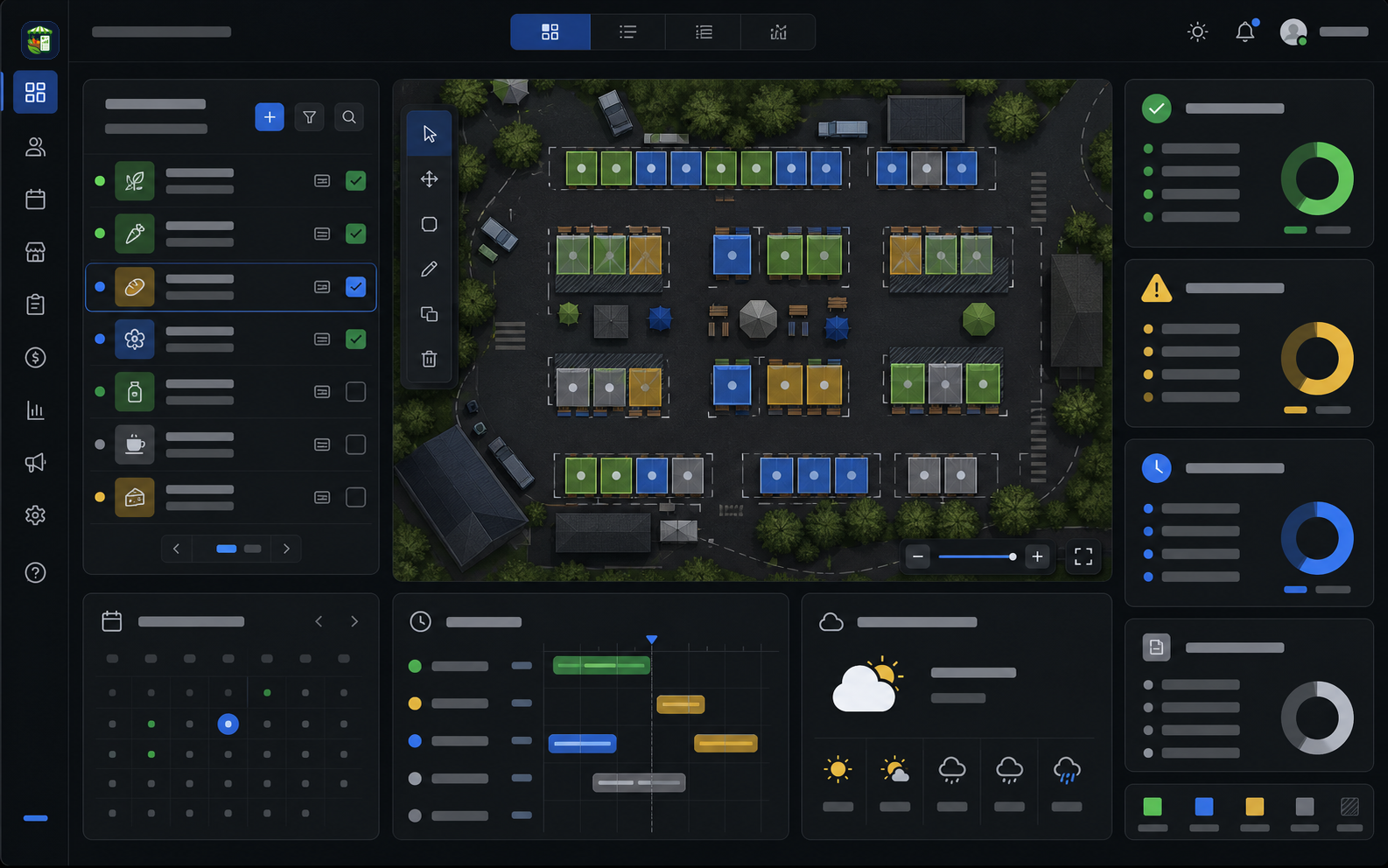
A market map is more useful when it does more than look organized. Farmers market teams need a modern visual layout editor, booth zones, vendor assignments, capacity context, public-safe visitor views, staff packets, and a way to keep day-of changes tied to the session record.
The Market Manager treats maps as part of the operating system. Booth planning connects to vendor readiness, permits, sessions, market-day notes, closeout, and public map publishing so the team does not manage a separate drawing and a separate spreadsheet.
Product image and outcome cards describing connected market operations.
Applications, vendors, permits, sessions, payments, and reports stay tied to the same market workflow.
The team can see readiness, gaps, assignments, and closeout work without rebuilding the story in spreadsheets.
Operational context carries from intake to market day so managers can act before small problems become urgent.
Each part of the page maps to a real operating decision: what replaces the spreadsheet stack, how the team works through the week, what stays connected, and what managers should measure.
The map workspace is built around a flexible visual editor rather than a static table, fixed row grid, or vendor-matching matrix. Teams can work with pan and zoom, selection, drag movement, resize and rotate controls, booth and zone objects, templates, review comments, warnings, version history, and public preview workflows.
That layout work stays connected to the operating record. The team can review what changed, which vendors are assigned, what still needs attention, and which public or staff outputs are ready without rebuilding a separate map export by hand.
Market-day changes happen: a vendor arrives late, a booth needs power, a space becomes unavailable, or the team has to move a vendor to a better location. The Market Manager map workflow supports assignment changes, drag-and-drop placement, swaps, unassign actions, booth status changes, object movement, resizing, and rotation.
Those changes can preserve the operating trail instead of becoming disconnected edits. Warnings, comments, versions, assignment health, and public-safe publishing checks help the team move quickly while still knowing what changed. Readiness warnings should be described as review context or publishing checks where configured, not as proof that ordinary layout movement is blocked behind permits or payments.
Market map planning starts with booths, zones, labels, booth types, amenities, assignment state, and vendor context. The important difference is that those objects connect back to the vendor directory and market record instead of living as a static image.
That connection helps managers see which vendors are assigned, which booths are open, which locations are unavailable, and which map decisions need follow-up before the next session.
For markets with dozens of vendors or more, visual booth planning needs to handle more than a pretty layout. Managers need to balance categories, identify open and unavailable spaces, review assignment health, prepare public-safe outputs, and keep weekly changes connected to the session record.
The Market Manager map workflow is designed for that operating pressure. It supports visual planning while keeping booth assignments close to vendor readiness, permits, attendance context, closeout notes, and reports.
Map work is not only visual. The team needs to know whether the plan is healthy before vendors arrive. Assignment health and map warnings help surface unassigned vendors, capacity gaps, zone concerns, and setup issues that should be reviewed before publishing or running the day.
Public maps should not expose manager-only notes, payment information, permit details, or private vendor records. The Market Manager supports visitor-safe public map output so markets can publish useful vendor, booth, and category context without exposing protected workspace data.
Published map widgets, public map snapshots, and search-friendly visitor views help the map become part of the public market experience while keeping private operating records behind authenticated access.
A single map rarely works for every audience. Staff, vendors, public visitors, load-in teams, sponsors, emergency plans, and operations routes often need different details. Map packets help teams prepare the right version for the right use case.
The map workspace includes review-oriented features that help teams improve plans without turning every change into a manual rebuild. Version history, review comments, collaboration state, cleanup recommendations, scenario planning previews, and layout suggestion previews support a more deliberate map workflow.
Some tools are strongest when the buyer only wants a visual layout builder. The Market Manager is strongest when the market wants maps connected to the rest of operations: applications, vendors, permits, sessions, attendance context, money review, closeout, and reporting.
Keep moving through the buying path with focused pages for adjacent workflows inside The Market Manager.
Direct answers for buyers comparing spreadsheets, form tools, and market-specific operating software.
Yes. The platform supports a modern visual map editor, market map planning, booth zones, booth assignments, map features, assignment health, public visitor-safe map outputs, and map packets for staff or vendor use.
The map workspace supports flexible visual layout workflows including pan, zoom, selection, drag movement, resize, rotate, templates, review comments, warnings, version history, public preview, and packet workflows.
Yes. The Market Manager supports drag-and-drop map workflows, booth and object resizing, rotation, assignment swaps, unassign actions, public visitor-safe map previews, and map packet workflows, while keeping those layout decisions connected to vendor records, sessions, warnings, comments, versions, and operating history.
No. The map workflow should not be reduced to a vendor matching matrix or fixed row grid. It supports visual object editing, booth and zone geometry, drag movement, resizing, rotation, templates, assignment context, warnings, comments, versions, and public outputs.
Yes. Managers can use assignment, drag-and-drop placement, assignment swaps, unassign actions, booth status changes, movement, resize, rotation, comments, warnings, and version history to handle late layout changes while preserving context.
Yes. The map workflow is built for real market layouts with many booths, zones, vendor assignments, open and unavailable spaces, assignment health, review signals, weekly changes, and public or staff map outputs.
Yes. Markets can publish visitor-safe public map outputs that show useful vendor, booth, and category context without exposing private manager records.
Yes. Map packet workflows can support staff, vendor, public visitor, load-in, emergency, sponsor, and operations-route contexts.
Yes. Booths can be open, assigned, unavailable, conflicted, or marked for no-show context, and assignments connect to vendor records.
No. The Market Manager is strongest when map planning needs to stay connected to applications, vendor readiness, permits, sessions, market-day notes, closeout, and reporting.
Yes. Assignment health, warning signals, review comments, version history, and scenario previews help teams review map issues before publishing or operating the session.
Read the supporting guides, checklists, and comparisons behind this workflow.